Wednesday, September 25, 2013

NFC, Mobile POS, and Closed Loop Mobile Payments


     NFC, Mobile POS, and Closed Loop Mobile Payments
NFC or Near Field Communications

NFC stands for Near Field Communications. It allows customers today to combine two worlds together. Mobile payment is paying through texting, a form of NFC.  An advantage is that mobile payments allow you to make transactions for products and services without being physically present. Another advantage is that contactless payments allow you to make transactions without having to actually touch anything. A device that uses radio frequency identification can be used to make a payment. It is quick and easy to do, and NFC combines the two features into one. NFC allows customers to make quick and easy payments on their smartphones. It gives customers the option to no longer swipe or text each time they make a payment and works with many different companies to allow customers to do this anywhere. There are some disadvantages such as limited touch-to-pay terminals (this is on the rise), not all credit card companies offer NFC payments, is not available with every mobile carrier, and you have to have a separate SIM card to enable this feature and if your phone is lost/stolen it is possible for someone to hack your credit card numbers.


Mobile POS or Mobile Point of Sale


Mobile Point of Sale, or Mobile POS, has been around for a long time. The first POS system, the cash register, was introduced in the 1870’s but it took until 1990's to go mobile. This new technology has changed how payments can be made. It is now faster and quicker than ever before. Mobile POS was first used in the restaurant industry. This allows waiters and waitresses to accept their customers’ payments at their table. Mobile POS enables the restaurant staff to make fewer  mistakes and to fix them quicker since they no longer have to run all the way back to the kitchen. Retailers like Apple have incorporated mobile POS devices in their stores to eliminate the use of cash registers. All transactions are made through mobile devices. Customers can use Mobile POS to check reservations and make payments on the spot. For example, Mobile POS allows people who sell at flea markets to accept credit cards without the hassle of bringing a credit card machine with them. This benefits the customers, allowing them to spend more and buy the things they want. Mobile POS has benefited both the customers and the sellers.


Closed Loop Mobile 


Closed Loop Mobile creates a new shopping experience for its customers. The main form of transaction for the Closed Loop Payment is through mobile devices like smartphones. This is important due to the fact that smartphones are currently highly in demand.  Some advantages of Closed Loop Mobile are that it allows places to offer more rewards, it allows merchants to take ownership of their customers more than ever since it helps eliminate the middle man, and there are benefits for both sides. Businesses can now make more money since they no longer have to pay the middle man. This results in allowing the customers to have fewer problems with payment transactions. Closed Loop Mobile helps benefit those who matter the most–the merchants and the customers. The future of “ease-shopping” is here!


      Sources: 

 
Kelly, John. N.p.. Web. 21 Sep 2013.  http://computer.howstuffworks.com/point-of-sale-mobile.html

 Didaskalou, Athan, and James Duthie. "Our thinking."CLOSED VS OPEN: A DEBATE ON THE FUTURE OF MOBILE PAYMENTS. N.p.. Web. 21 Sep 2013. http://dtdigital.com.au/our-thinking/post/closed-vs-open-a-debate-on-the-future-of-460 .

Group, Mercator Advisory. "Mercator Advisory Group."Mobile Opportunities for Closed-Loop Issuers. N.p.. Web. 21 Sep 2013. http://www.mercatoradvisorygroup.com/index.php?doc=Prepaid&action=view_item&id=769&catid=16 . 


Wednesday, September 18, 2013

SMS, USSD and WAP Mobile Payments


SMS, USSD and WAP Mobile Payments

 SMS or Standard Messaging Service

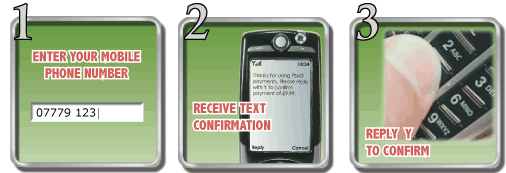
SMS Payments are one of the easiest ways to pay for items since there are no passwords or account numbers to remember. You do not even have to have a bank account, which is one reason SMS payments are so popular in developing countries. It usually only takes less than a minute to complete a purchase. This service is perfect for bill payments, money transfers, deposits and withdrawals, accessing account information and to confirm transaction status. There are three ways in which SMS Payments can be sent. The primary way is through a website and a code which the consumer is sent via a web page. Then the consumer sends this code to the text number and they pay for their purchase. Another way is entering their phone number into a website. The retailer then sends a text with a code and the consumer enters this code to purchase online items. The last way is through direct text and this is used primarily by charities. The consumer just sends a text to an advertised number and their contribution is received by the charity. SMS payment options are perfect for people without smart phones since only texting is required.


USSD or Unstructured Supplementary Services Data

This mobile payment option is only available on GSM carrier networks which currently are AT&T and T-Mobile.  This service can be used for many mobile banking needs such as balance inquiry, money transfers, bill payments and the purchase of airtime minutes. The advantage of USSD versus SMS messaging is that it is more secured because it is “real-time connection unlike SMS which stores and forward protocol (Clickatell’s)”.  This service usually does not cost the end user any fees. The disadvantages are that “Phase 2 functionalities include session based communication and only work on updated GSM phones and most global networks are still not updated to Phase 2 USSD (Van, 1)”· GSM networks are not standard in developing counties so they do not support USSD services.    


WAP or Wireless Application Protocol

In order to use a WAP based mobile payment, you will need to download an application and install it on your smart phone. This will then lead you to a particular web page that will be displayed on your mobile phone. This makes paying for items very easy and allows the consumer the benefit of being able to keep track of their purchases through Follow-on sales. “These pages can be bookmarked easily by consumers, because they have specific URL, and it is so easy to re-visit the pages or share them. (Admin, 1)”. WAP payments are quick and help ease consumer’s security concerns by paying predictable way on one site. Some of the disadvantages of using WAP mobile payments is that the small screen to view webpages on some smartphones makes it hard to navigate, limited availability of service in some areas since you must be connected to the Web and the price of smartphones makes it unaffordable to some people.


 Sources

Van. Long. “Use of USSD technology in Mobile Banking”. Mobile-Finncial.com. 08 Aug. 2009. Web. 18 Sept .2013. http://mobile-financial.com/blogs/use-ussd-technology-mobile-banking

Lumia. “How do SMS Payments Work for Users?”. Mobile Transaction. 07 April 2013. Web. 18 Sept 2013. http://www.mobiletransaction.org/how-do-sms-payments-work-for-users/

“Interact with Unstructured Supplementary Service Data (USSD)”. Clickatell. 2013. Web. 18 Sept. 2013.  https://www.clickatell.com/clickatell-products/enterprise-products/ussd/

Admin. “Mobile web payments (WAP)”. Varshyl. 12 Feb. 2013. Web. 18 Sept. 2013. http://www.varshyltech.com/article/mobile-web-payments-wap/


Tuesday, September 10, 2013

Have a Smartphone? Check this out!


Mobile Wallets


      As technology continues to expand rapidly so does the mobile payment world. The vast majority of people these days have some sort of Smartphone, which is why Mobile Wallets are recently getting a huge buzz. Go to Starbucks and they can scan your phone to pay for your drinks. Many other businesses are picking up with this convenient method of payment. Consumers are always looking for a way to be more convenient in their everyday lives and this definitely helps. Doesn’t it sound awesome to not have to carry your wallet or purse around, just your phone (which I know most of you, like me, always has it with you anyway)? Are you also one of those people (like myself) who have a million Rewards cards attached to your key chain? Wouldn’t it be nice to just have those stored on your phone and they can scan it that way for you? If this does sounds like you, don’t worry, I’m definitely going to give you some awesome apps for your Smartphones to check into!

     I know many people are worried about the security in all of the mobile payments. Since this industry is so popular, they are making sure that they do everything they can to make your information as secure as possible. Most of the apps I will mention will make you enter a PIN number before you access any of your most personal information to make sure no one else can get access into it. Security is the number one reason why many people are so opposed to digital payments, but all of the people making these programs for you completely understand and are making everything secure.

     Mobile Wallets are so convenient that everyone should have them on their Smartphones. They have apps for you to store your Insurance cards, Driver’s License, and your credit cards. I’m telling you, this is really going to blow your mind!


Top Apps for Smartphones:


·      Lemon Wallet – for iPhone, Android, and Windows Phones
o   This app allows you to store your credit cards, rewards cards, Drivers License, and Insurance cards in case of emergencies. If you forget your wallet, or if it gets stolen, this app has all the information you need to just carry your Smartphone around with you and have everything you need.


·      Isis – for Android phones
o   This is an app for Android phones only. It allows you to pay certain bills, and some businesses have it for you to pay your bill with this app instead of getting out your wallet and swiping your card and going through that hassle. It is even hooked up to your e-mail account to send your receipt straight to your e-mail instead of carrying old receipts around in your wallets! Other Android only apps include: Google Wallet, M1 Mobile Wallet, and Virtual Wallet by PNC


·      Square Wallet – for iPhone and Android
o   This app is extremely amazing! Only a select few stores have this system, but if they do definitely use it. You check into the store your at order from your phone and then they charge it to your card automatically. No scanning or anything involved, just give them your name and all is charged! Extremely convenient, safe, and secure to use!
An iPhone with the Square Card Case app installed. Looks like a wallet with cards in it.


-Other apps to consider:  Passbook, Geode by ICache, Chirpify, Venmo, Dwolla, and of course, PayPal

     Most of these apps, when you download them, come with a rewards program with them. The more you use it, you earn points, and redeem coupons and free stuff! Who doesn’t want that? The apps that I listed, I have done research on, and are definitely the ones to use. They are secure, I wouldn’t steer you wrong! This seems so easy to use and so convenient! Definitely check them out!


Sources:
Brian. "Hongkiat.com." Hongkiatcom RSS. Web 2.0, n.d. Web. 10 Sept. 2013. http://www.hongkiat.com/blog/digital-wallets/
 
Davis, Mark. "Digital Wallet Apps Unfold in KC as Smartphone Users, Businesses Discover the Mobile Way to Pay." Digital Wallet Apps Unfold in KC as Smartphone Users, Businesses Discover the Mobile Way to Pay. Kansas City Business, 20 July 2013. Web. 10 Sept. 2013. http://www.kansascity.com/2013/07/20/4357393/digital-wallet-apps-unfold-in.html
 

Wednesday, September 4, 2013

Introduction to Digital Payments

 
Digital payments are any type of payments that do not involve cash or a paper check. Currently there are 6 common forms of digital payments, however, new types continue to be developed continuously. Payments can be broken down into the following:
o   Credit and Debit Cards
o   Internet
o   Mobile Payments
o   Financial Service Kiosks
o   Electronic Payment Network
o   Person-to-Person (P2P) Payments


The most common form of digital payment are credit, debit and prepaid cards. These cards have a magnetic strip that the retailer swipes through the terminal. The retailer transmits the data to their bank. The bank then transmits the data to a card association who makes a decision on the transaction and relays it back to the retailer. As of March 2013, there is a combination of 510.5 million US consumers using MasterCard, American Express and Visa credit cards (Ray.Ghahremani).
Internet payments involve transferring money or making purchases online. Consumers and businesses can transfer money to third parties from the bank or other accounts. Purchases can also be made using credit, debit or prepaid cards. 73.5% of U.S. consumers now use online bill payment. This confirms that online bill payment is now the dominant way we pay bills in the U.S (McPearson).  
Mobile Payments allow consumers to use their mobile phone to pay for goods and services. There are six different common types of mobile payments: Standard Messaging Service (SMS)/ Unstructured Supplementary Service Data (USSD), Wireless Application Protocol  (WAP)/Mobile Web, Near Field Communication (NFC), Mobile Wallet, Mobile as the POS and Closed Loop Mobile Payments. Mobile payments have more than doubled in popularity, reaching over 33% of U.S. consumers (McPearson). As with everything in the computer world today this is a growing area and other types are being developed continuously.
Financial Service Kiosk are fixed stations that have a phone connections where the customer uses a keyboard and monitor to access information and make transactions. These kiosk are usually located in convenient public places and allow easy access to consumers who do not have access to the internet or mobile phones.  
Electronic Payment Network handles numerous types of credit and debit transfers, such as payroll payments, dividends, loan payments and insurance premiums.  The Automated Clearing House (ACH) system is the only one to serve the private sector in the U.S..
Person-to-Person (P2P) Payments allow a consumer to pay another using an account, a prepaid card or another source of funds. These are online services that you send or receive money from virtually anyone with an e-mail address who's enrolled in the service. The most common in the U.S. is PayPal.

SOURCES

Ray. Daniel P and Ghahremani. Yasmin. “Credit card statistics, industry facts, debt statistics”. CreditCards.com. 22 Aug. 2013. Web. 1 Sept. 2013. http://www.creditcards.com/credit-card-news/credit-card-industry-facts-personal-debt-statistics-1276.php

McPearson, Aaron.  “New IDC Financial Insights Consumer Payments Survey Reveals Over a Third of all U.S. Residents Use Mobile Payments”. Idc-fi.com. 9 July 2012. Web. 1 Sept 2013. http://www.idc-fi.com/getdoc.jsp?containerId=prUS23585112

Hord. Jennifer. “How Electronic Payments Work”.Howstuffworks.com. Web. 1 Sept. 2013. http://money.howstuffworks.com/personal-finance/online-banking/electronic-payment1.htm